


Facebook Login Notifications
Hey, Facebook users – after a very long time I have again come to my place. My Blog. Was a bit busy settling my second career and with Facebook. But I am back now. Did you know that you can set up India's favourite social networking site to send you an e-mail or even a text message if anyone tries to access your account from a new device?
It’s great for that extra layer of security – and I highly recommend it!
Here’s how:
Hey, Facebook users – after a very long time I have again come to my place. My Blog. Was a bit busy settling my second career and with Facebook. But I am back now. Did you know that you can set up India's favourite social networking site to send you an e-mail or even a text message if anyone tries to access your account from a new device?
It’s great for that extra layer of security – and I highly recommend it!
Here’s how:
While logged in to Facebook, click the arrow next to your name, then Account Settings.

Once at the Account Settings control panel click the security category off to the left, then click Edit.
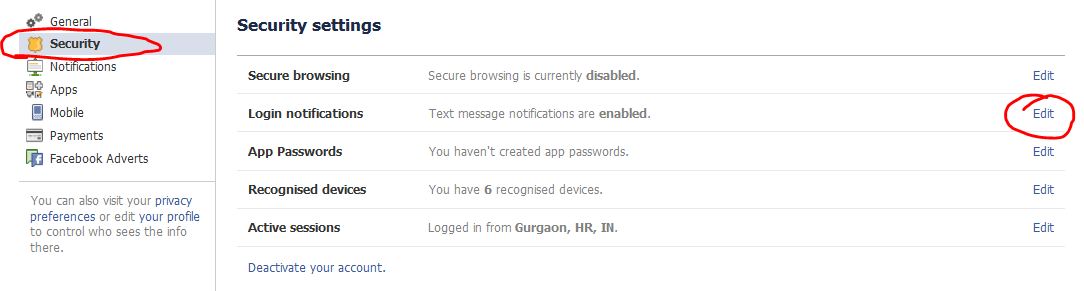
Now simply choose how you’d like to receive a notification when/if your account is accessed from a new/different computer. Click Save Changes when you’re finished!


 Posts
Posts


